
Taylor Swift Chrome Extension
Overview
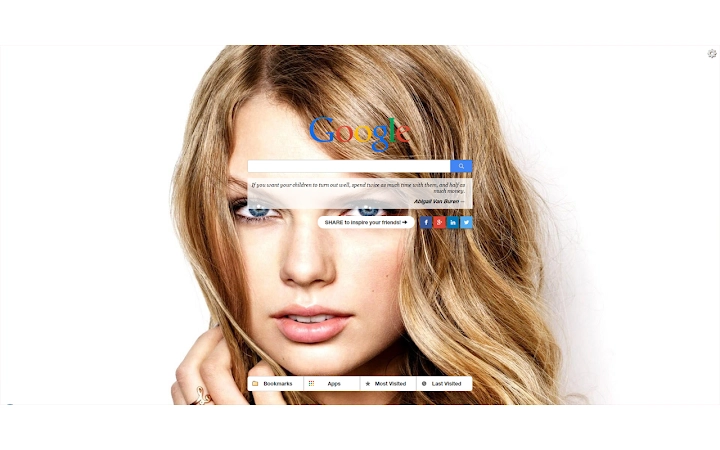
The Taylor Swift Chrome Extension is a browser-based utility designed to enhance daily web browsing with a personal touch. It serves as a customizable homepage replacement, offering users a daily dose of inspiration and entertainment through high-definition images of Taylor Swift. The extension is particularly suited for fans seeking a joyful, visually engaging browsing experience.
It simplifies navigation with integrated tools such as a Google search bar, speed dial, and dedicated panels for apps, bookmarks, and frequently visited sites. While the primary focus is on aesthetic appeal and user convenience, it also aims to streamline access to commonly used web resources. The developer did not provide additional details about their background or development history.
Real-world usage scenarios include setting the extension as a default homepage for morning browsing, using it as a motivational tool with daily quotes, or enhancing the desktop experience with personalized visuals. The extension is available at no cost, making it accessible to a broad audience.
Key Features & Capabilities
- HD Image Rotation: Displays a fresh, high-definition image of Taylor Swift every time a new tab is opened. The visual content is updated daily, offering a consistent and engaging aesthetic.
- Integrated Google Search: Includes a standard Google search bar directly on the new tab page, enabling quick access to web searches without navigating away.
- Speed Dial Functionality: Allows users to pin frequently visited websites for one-click access, improving browsing efficiency.
- Navigation Panel: Features dedicated sections for Apps, Bookmarks, Last Visited, and Most Visited sites, helping users organize and access their favorite resources.
- Daily Inspirational Quotes: Presents motivational or entertaining quotes daily, adding a personal and uplifting touch to the browsing experience.
These features are designed to enhance usability and personalization. For example, a fan might use the speed dial to quickly access music streaming platforms, while the navigation panel helps keep track of favorite blogs or social media pages. The Google search integration ensures that users don’t lose time switching between tabs. The combination of visual appeal and functional tools makes this extension ideal for individuals who value both form and function in their digital environment.
User Interface, Workflow & Performance
The extension features a clean, minimal interface centered around a large, visually prominent image of Taylor Swift. The layout is structured to prioritize the main visual element while placing essential tools—such as the search bar and speed dial buttons—within easy reach. Navigation is intuitive, with clearly labeled sections for apps, bookmarks, and visit history.
Users can access the speed dial and navigation panels with a single click, streamlining workflow efficiency. The overall design emphasizes ease of use, making it suitable for both casual and regular users. Performance observations are based on general software behavior patterns.
The developer did not specify resource usage details, so CPU and RAM behavior cannot be confirmed. Stability appears consistent with typical browser extensions, though real-world testing data was not provided. The extension loads quickly and does not appear to interfere with page rendering or tab management.
Compatibility & System Requirements
The Taylor Swift Chrome Extension is compatible with Windows, Mac, and Linux operating systems. It is designed to work within the Chrome browser environment, as indicated by the developer. The installation size is 1.2 MB, which is minimal and suitable for most devices.
Exact system requirements were not listed, so hardware specifications such as RAM or processor type are not confirmed. Compatibility information was partially provided, and users should ensure their Chrome browser is up to date for optimal performance. No additional dependencies were mentioned.
The extension does not require administrative privileges for installation, and it functions entirely within the browser’s sandboxed environment.
Pros and Cons
Pros
- Visually appealing with daily HD images of Taylor Swift
- Includes useful tools like Google search and speed dial
- Organized navigation panels for apps, bookmarks, and history
- Lightweight at only 1.2 MB
- Completely free to use
Cons
- Limited to Chrome browser only
- Depends on external content (images and quotes) for core functionality
- Minimal customization options for layout or design
- Not suitable for users not interested in Taylor Swift or fan content
- Performance data not publicly available
FAQ Section
Is the Taylor Swift Chrome Extension compatible with all browsers?
The extension is specifically designed for the Chrome browser. It may not function on other browsers such as Firefox, Edge, or Safari unless ported by the developer.
Is the extension safe to install?
Yes, the extension operates within the Chrome browser’s security model. It requests access only to read apps, bookmarks, and browsing history, as stated in the permissions explanation. No sensitive data is collected or transmitted beyond these basic functions.
How do I update the extension?
Updates are automatically managed by the Chrome Web Store. When a new version is available, Chrome will prompt the user to update it. Users can also manually check for updates via the Chrome Extensions page.
What type of license does this extension use?
The extension is distributed under a free license. It is available at no cost and does not require a subscription or activation key.
Can I use this extension offline?
Yes, the extension functions offline after initial installation. The core features—including speed dial, navigation panels, and stored quotes—work without an internet connection. However, the daily image update requires an active connection to fetch new content.
Final Thoughts
The Taylor Swift Chrome Extension delivers a unique blend of entertainment and utility, tailored for fans who want a personalized browsing experience. Its clean interface, daily HD imagery, and practical tools like speed dial and Google search make it more than just a novelty. While it is limited to Chrome and appeals primarily to fans of the artist, its lightweight design and zero cost make it a compelling choice for those seeking a fun, functional homepage replacement.
The integration of navigation and search tools ensures that usability is not sacrificed for aesthetics. For users who value both visual inspiration and browsing efficiency, this extension offers a satisfying balance. Download Taylor Swift Chrome Extension now.







